Herdr · iOS
Herdr on iPhone & iPad: run and steer your agents from iOS
Herdr is a terminal workspace manager built for AI coding agents, keeping each agent running in its own terminal. QuickTUI lets you open those workspaces on iPhone and iPad, see every agent's state and take over whenever you need to.
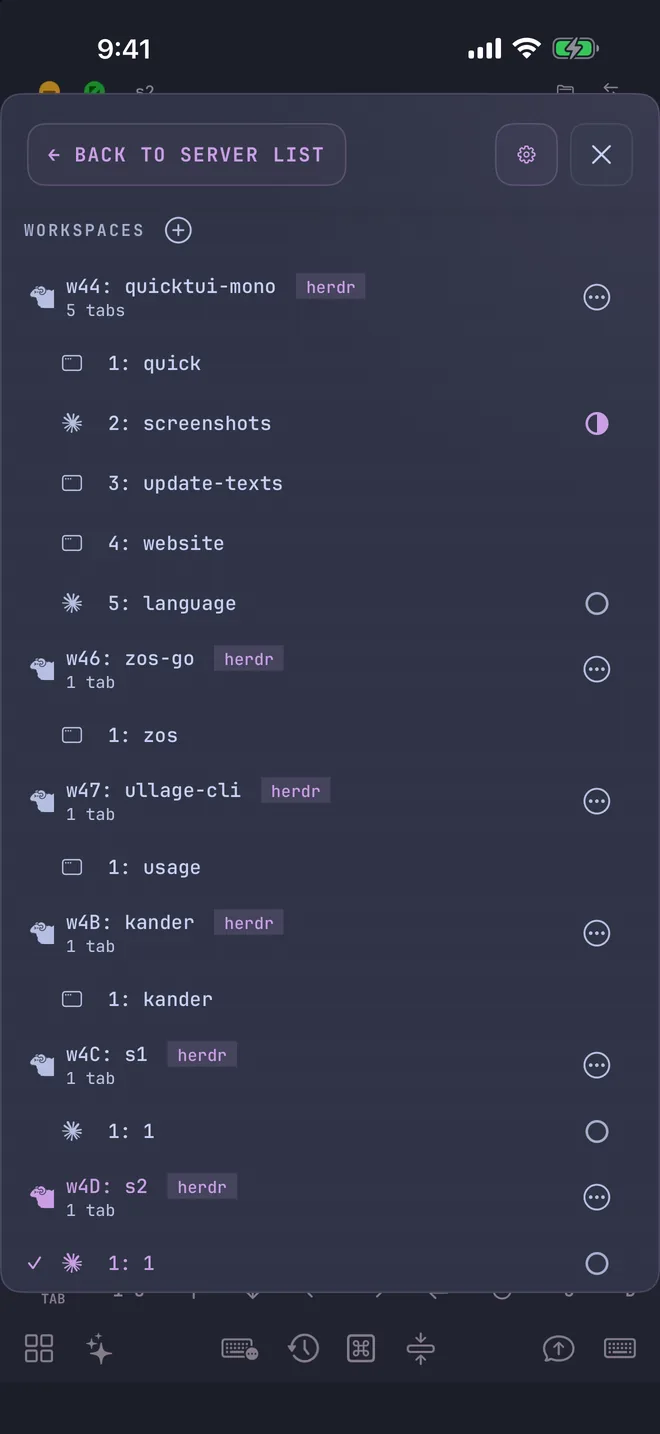
What is Herdr?
Herdr is an open-source (Apache 2.0) terminal workspace manager. It runs in the background as a single Rust program, and your terminals live inside it. It supports macOS, Linux and Windows.
Like tmux, Herdr keeps terminals running after you disconnect. Unlike tmux, it knows which terminals are running agents and whether each one is working, waiting for input or idle.
Why we recommend Herdr with QuickTUI
- Agent status at a glance
- Every tab and pane in the Session Manager shows its agent's state: idle, working, waiting for input or done. Away from your desk, you can still see which agent needs you.
- Launch agents with the Agent Wizard
- Pick an agent, model and options in the app; QuickTUI opens a new Herdr tab and starts it. ZCode, Mistral Vibe, Crush, Goose and Auggie can't be launched in Herdr this way; start them in tmux, or type their command in a Herdr tab.
- The default backend
- When Herdr is available, the server uses it by default. If your computer has neither tmux nor Herdr, the installer installs Herdr for you.
- Works on Windows
- Sessions on Windows run in Herdr; on Windows, QuickTUI supports Herdr only.
- Pick up after a drop
- After a brief disconnect, reconnecting resumes the same terminal. How long it's kept is set by
herdr_client_retention, 5 minutes by default.
Get started
- Install QuickTUI from the App Store and open the setup wizard.
- Choose Connect Over SSH — Enable Enhanced Features (Recommended) and enter your computer's SSH login.
- Tap Install. If your computer has neither tmux nor Herdr, the installer installs Herdr, then pairs automatically.
On Windows, or on a computer without SSH access, run the install command on the computer and pair by scanning a QR code:
# macOS / Linux
curl -fsSL https://quicktui.ai/q.sh | sh -s -- install --channel server2

# Windows (PowerShell)
& ([scriptblock]::Create((irm https://quicktui.ai/q.ps1))) install --channel server2
Already using tmux and want to switch to Herdr? Install Herdr, then restart the QuickTUI service:
# macOS / Linux
curl -fsSL https://herdr.dev/install.sh | sh
~/.local/bin/quicktui-server service restart
The server detects and enables Herdr automatically and starts it when needed; you don't need to run it yourself. QuickTUI needs Herdr v0.8.0 or later, and copy mode needs v0.9.0 or later. See the FAQ for other install options.
How Herdr maps to the app
- Herdr workspace
- Shows up in the app as a Workspace, in the same order as Herdr's sidebar.
- Herdr tab
- Shows up in the app as a Session, with an agent status icon.
- Herdr pane
- Stays a pane, which you can switch to, zoom and close.
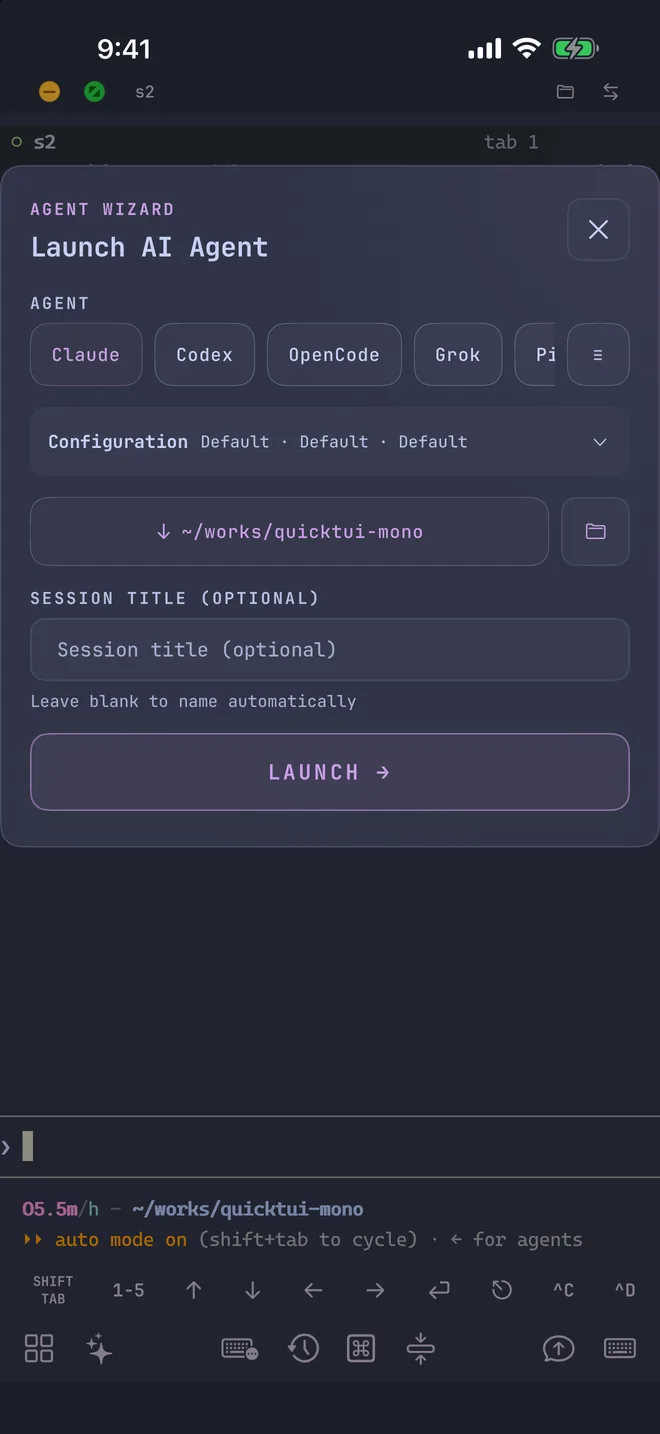
What you can do from your phone
- Workspaces
- Create and rename workspaces. Closing a workspace is done in Herdr on your computer.
- Sessions (tabs)
- Create, rename and close tabs. Each workspace keeps at least one tab.
- Panes
- Switch to, zoom and close panes. Splitting panes and changing layouts are done on your computer.
- Scroll and copy
- Scroll through output; in copy mode, output keeps flowing (requires Herdr v0.9.0 or later).
Using tmux as well
tmux and Herdr can be enabled together. The app lists workspaces from each backend and lets you pick the backend when creating one. For tmux support, see tmux on iPhone & iPad.
FAQ
Do I need to start Herdr myself?
No. The QuickTUI server starts Herdr when needed. Disconnecting in the app never stops Herdr or closes any pane.
Does it work on iPad?
Yes. The same app runs on iPhone and iPad. There's also an Android app (Preview).
How much does it cost?
Herdr is open source. On iPhone and iPad, QuickTUI is free to download and the free version connects to one computer; QuickTUI Pro is a one-time purchase that unlocks unlimited computers. The Android app (Preview) includes every feature for free during the preview. QuickTUI Relay is an optional subscription, needed only when you can't connect directly.