Use case · AI agents
Control AI agents from your phone
Control terminal-based AI coding agents from your mobile device while keeping execution firmly rooted on your development machine. QuickTUI provides live terminal attachment for Claude Code, Codex, Grok Build, OpenCode, Pi, Kimi Code, and any CLI agent: monitor progress, grant tool permissions, and guide multi-step workflows from iPhone, iPad, or Android (Preview) while your background tasks run uninterrupted.
How Mobile Agent Control Works
- Start a run
- Launch an agent with the Agent Wizard, or type its command in a terminal, then give it a task.
- Watch the real terminal
- You see the agent's live terminal output with full scrollback, not a summary.
- Review and steer
- Answer questions, review diffs, approve or reject tool calls, and redirect the agent when it drifts off course.
- Keep it running
- The agent runs in tmux or Herdr on your computer, so it keeps working when you close the app. After a network change or a brief drop, the app reconnects to the same session.
Supported agents
QuickTUI works with any agent that runs in a terminal. These agents have dedicated support in the app:
| Agent | Agent Wizard | Live status (Herdr) | Command palette | Guide |
|---|---|---|---|---|
| Claude Code | tmux, Herdr | Yes | Yes | Claude Code guide |
| Codex | tmux, Herdr | Yes | Yes | Codex guide |
| Grok Build | tmux, Herdr | Yes | Yes | Grok Build guide |
| OpenCode | tmux, Herdr | Yes | Yes | OpenCode guide |
| Pi | tmux, Herdr | Yes | Yes | Pi guide |
| Kimi Code | tmux, Herdr | Yes | Yes | Kimi Code guide |
| ZCode | tmux only | No | No | ZCode guide |
The Agent Wizard can also launch Cursor, Qoder, Gemini, GitHub Copilot, Qwen Code, Kiro, Factory Droid, Mistral Vibe, Crush, Amp, Goose and Auggie. Mistral Vibe, Crush, Goose and Auggie launch in tmux only. Any other CLI agent works too: start it by typing its command in a terminal.
Launch agents with the Agent Wizard
The Agent Wizard starts an agent without typing a command. It opens the agent in a new window of the current tmux session, or in a new tab of the current Herdr workspace. It isn't available on the Luvus backend.
- Mode
- Each agent's own permission modes, such as its default mode, plan mode or YOLO mode (runs tools without asking).
- Model and effort
- Pick a model, and the reasoning effort for agents that support it.
- Working directory
- Choose the folder the agent starts in, with recently used folders one tap away.
- Resume
- Continue a previous agent session. Resume is available in tmux; Herdr doesn't support it.
- Presets and custom models
- Save the settings you use often as a preset, and add your own models under Settings → Agent Models.
If the agent isn't installed on your computer, the app tells you its command wasn't found. Install the agent first, then launch it again.
Supervise several agents at once
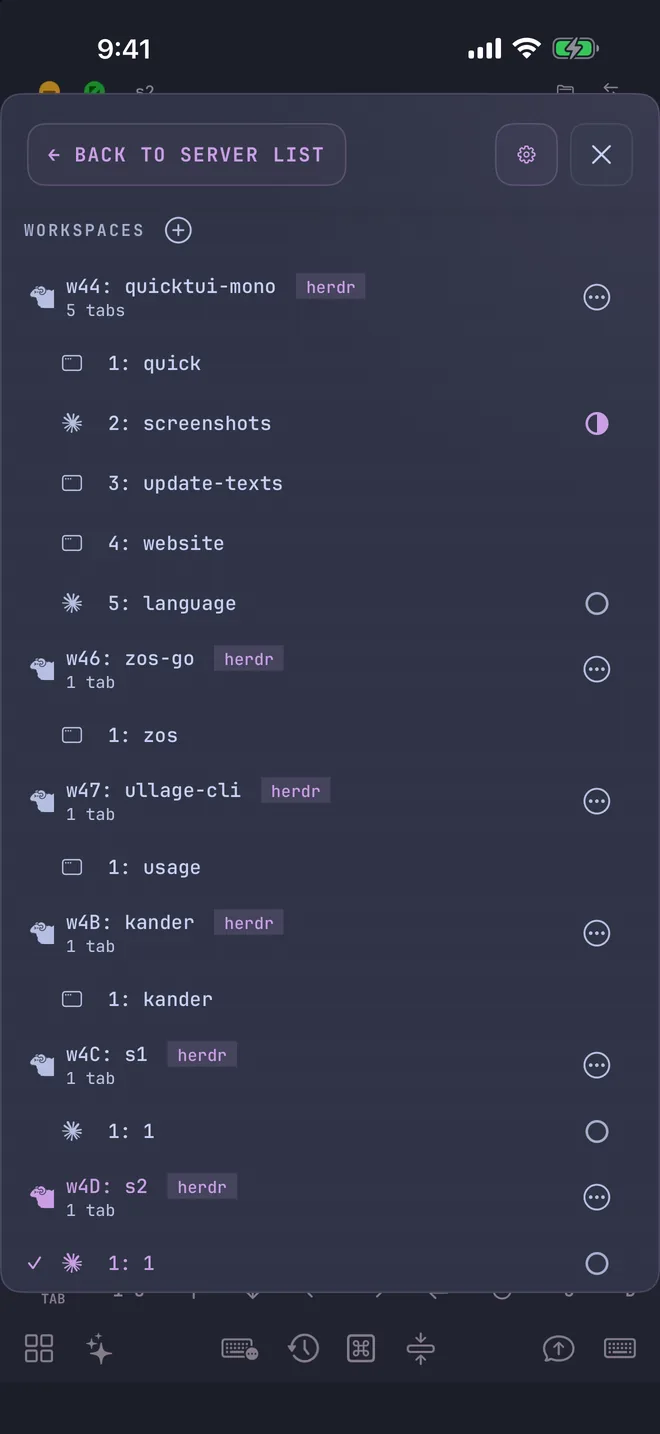
Give each agent its own window or tab: one building a feature, one running tests, one reviewing a pull request. With Herdr, the Session Manager shows whether each agent is idle, working, waiting for input, or done, and highlights the session that needs you. Claude Code, Codex, OpenCode, and Grok also get their own icons in the list.
On iPhone and iPad, the free version connects to one computer, and QuickTUI Pro is a one-time purchase that unlocks unlimited computers. The Android app (Preview) includes every feature for free during the preview.
Get set up
- Install QuickTUI from the App Store, or install the Android app (Preview), and open the setup wizard.
- Choose Connect Over SSH — Enable Enhanced Features (Recommended) and enter the SSH login of the Mac or Linux computer where your agents run.
- Tap Install. The app installs the QuickTUI server over SSH and pairs automatically. If your computer has neither tmux nor Herdr, it installs Herdr.
On a Mac or Linux computer without SSH access, run the install command on the computer, then pair by scanning a QR code:
curl -fsSL https://quicktui.ai/q.sh | shOn Windows, get QuickTUI Server from Microsoft Store, open it from the Start menu and scan the QR code it shows. Sessions on Windows run in Herdr, which you install separately; see Windows in the install guide.
Traffic between your phone and your computer is end-to-end encrypted, and the app connects directly to your computer by default. See the install guide for details.
FAQ
Can I control Claude Code or Codex from my phone?
Yes. Run the agent in tmux or Herdr on your computer and open that session in QuickTUI on your phone. You get the live terminal, so you can give instructions, approve tool calls and review changes. See the Claude Code and Codex guides.
Which AI agents does QuickTUI support?
Any CLI agent that runs in a terminal. The Agent Wizard has launch settings for 19 agents, including Claude Code, Codex, Grok Build, OpenCode, Pi, Kimi Code, Gemini, GitHub Copilot and Cursor.
Does the agent keep running when I close the app?
Yes. The agent runs in a tmux or Herdr session on your computer, not on your phone. Reopen the app and you're back in the same live session.
Can I run several agents at the same time?
Yes. Run each agent in its own window or tab and switch between them in the app. With Herdr, the Session Manager shows each agent's status.
Does my code pass through QuickTUI's servers?
No. The app connects directly to your computer by default, and the connection is end-to-end encrypted. The optional QuickTUI Cloud relay, used only when a direct connection isn't possible, forwards encrypted traffic it can't read.