tmux · iOS
tmux on iPhone & iPad: attach your real tmux sessions from iOS
While there is no official tmux client for iOS, QuickTUI attaches directly to the real tmux sessions running on your host machine. Resume your work seamlessly from iPhone or iPad with full window, pane, and scrollback support.
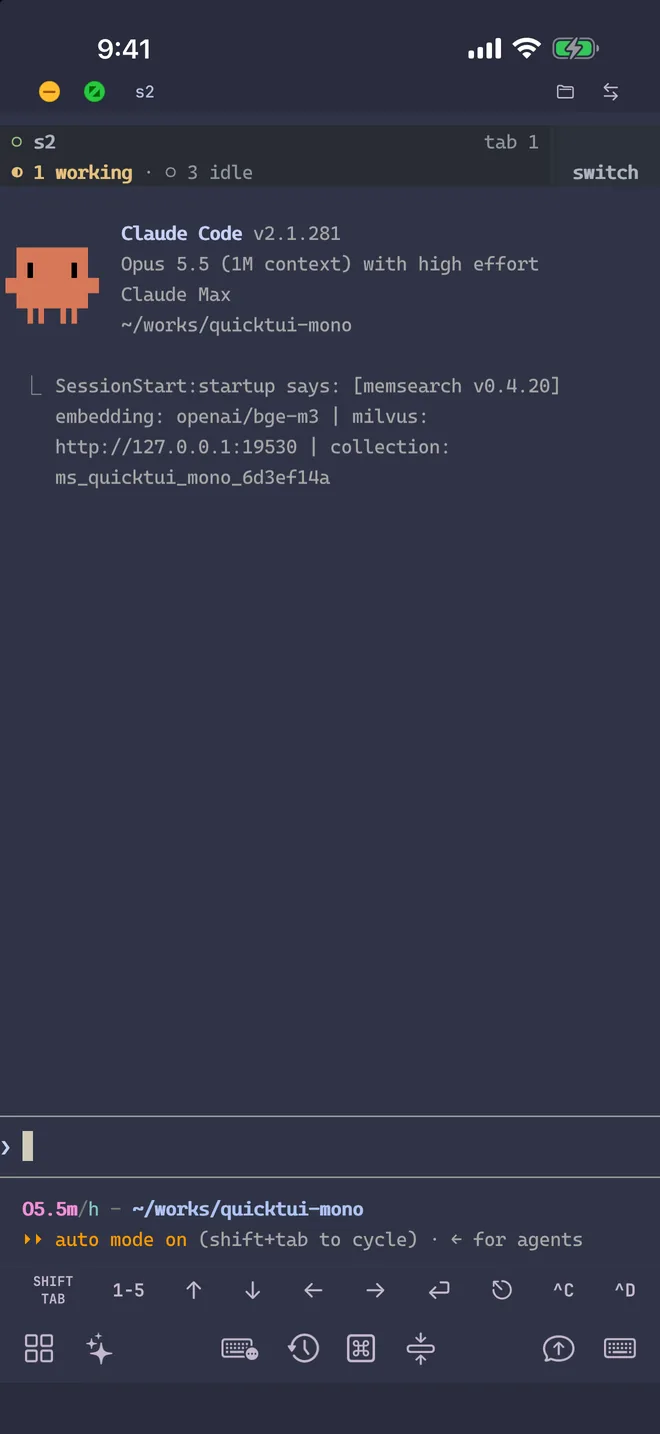
tmux keeps terminal sessions running on your computer: long builds, agents, log tails and SSH connections all survive when you disconnect. QuickTUI runs a lightweight server on your computer that attaches to those sessions directly, with end-to-end encryption between your phone and your computer and no third party handling your code or keys.
Core Mobile Terminal Requirements
- Attach, don't restart
- Sessions keep running on your computer. Open the app and you're back in the live view with output and state intact.
- A real terminal
- tmux windows, panes and scrollback work fully on iPhone and iPad. It's not a chat box.
- Resilient connections
- Switching between Wi-Fi and cellular, backgrounding the app, or intermittent network drops reconnect automatically.
- Private and self-hosted
- Connects directly to your own computer by default with end-to-end encryption.
Get started
- Install QuickTUI from the App Store and open the setup wizard.
- Choose Connect Over SSH — Enable Enhanced Features (Recommended) and enter the SSH login of the Mac or Linux computer running tmux.
- Tap Install. The app installs QuickTUI Server over SSH and pairs automatically.
On a Mac or Linux computer without SSH access, run the install command on the computer and pair by scanning a QR code:
curl -fsSL https://quicktui.ai/q.sh | shOn Windows, get QuickTUI Server from Microsoft Store, open it from the Start menu and scan the QR code it shows. Sessions on Windows run in Herdr, which you install separately; see Windows in the install guide.
See the install guide for full steps, and attach a tmux session from your phone for a walkthrough.
It's your own tmux
QuickTUI controls the real tmux on your computer; it isn't an emulation or partial reimplementation. It connects to the tmux server you already use, so your existing sessions show up in the list, and your ~/.tmux.conf, key bindings, windows and panes all work as usual.
QuickTUI needs tmux 3.2 or later. If tmux isn't installed, see the FAQ. How tmux maps to the app:
- tmux session
- Shows up in the app as a Workspace.
- tmux window
- Shows up in the app as a Session.
- tmux pane
- Stays a pane, which you can switch to, zoom and close.
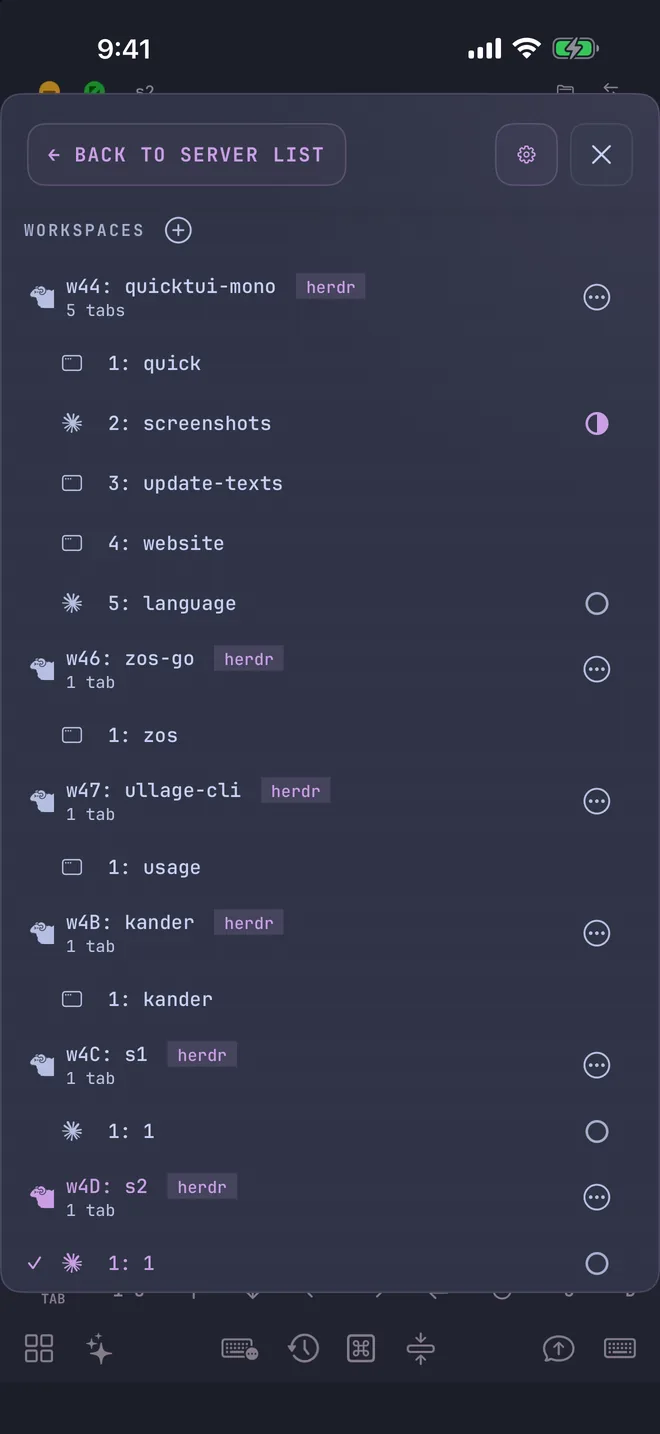
What you can do from your phone
- Manage workspaces and sessions
- Create, rename and close tmux sessions and windows, and switch between them in the Session Manager.
- Work with panes
- Switch to, zoom and close panes, with an option to auto-zoom the selected pane.
- Scroll and copy
- Scroll Mode maps to tmux copy mode with half-page paging; Select Mode supports copy, smart copy and paste history.
- Lock the terminal size
- With "Lock tmux size to client" enabled, tmux pins its viewport to your device when connected, preventing display resolution conflicts with desktop terminal windows.
- Matching colors
- The app tells tmux its terminal background color, so tools like Claude Code and Codex pick the right dark or light theme.
- TUI tool hints
- When the Claude Code or Codex CLI config file doesn't turn fullscreen mode on, the app shows how to turn it on to keep scrollback clean.
Using Herdr too?
QuickTUI also supports Herdr, and we recommend it: Herdr knows each agent's state, so the app shows whether it's idle, working, waiting for input or done. tmux and Herdr can be enabled together, and the app lists workspaces from each backend.
FAQ
Is there an official tmux app for iOS?
No. tmux runs on your computer and has no official iOS client. QuickTUI is a native iPhone and iPad app that connects to tmux on your computer.
Do I need to stay connected over SSH?
No. SSH is used once, when the setup wizard installs the server. After that the app connects to the QuickTUI server directly on your local network, or from outside through a VPN, a tunnel or the optional QuickTUI Cloud relay, always end-to-end encrypted.
Does it work on iPad?
Yes. The same app runs on iPhone and iPad, and both can attach to the same session at once. There's also an Android app (Preview).
How much does it cost?
On iPhone and iPad, the app is free to download and the free version connects to one computer; QuickTUI Pro is a one-time purchase that unlocks unlimited computers. The Android app (Preview) includes every feature for free during the preview. The QuickTUI Cloud relay is needed only when you can't connect directly. Every account gets free relay traffic each month; a QuickTUI Cloud subscription covers regular use.