Guide · Codex CLI
Run Codex CLI from your phone
Supervise OpenAI's Codex CLI on your host workstation from iPhone, iPad, or Android using QuickTUI. Codex executes autonomously within its configured sandbox, while QuickTUI keeps you connected to review changes, respond to confirmations, and assign new tasks on the go.
What is Codex CLI?
Codex CLI is OpenAI's coding agent for the terminal. It works in your repository, edits files and runs commands, with approval and sandbox settings that control how much it can do on its own. QuickTUI gives you that terminal on your phone, attached to a tmux or Herdr session so Codex keeps running after you disconnect.
Set up Codex CLI and QuickTUI
- Install Codex on the computer where it should run, then run
codexonce and choose Sign in with ChatGPT.# macOS / Linux curl -fsSL https://chatgpt.com/codex/install.sh | sh # Windows (PowerShell) powershell -ExecutionPolicy ByPass -c "irm https://chatgpt.com/codex/install.ps1 | iex" # Or with npm / Homebrew npm install -g @openai/codex brew install --cask codex - Install QuickTUI on your phone: from the App Store for iPhone and iPad, or the Android (Preview) build.
- In the app's setup wizard, choose Connect Over SSH — Enable Enhanced Features (Recommended), enter the computer's SSH login and tap Install. The app installs the QuickTUI server and pairs automatically. If the computer has neither tmux nor Herdr, it installs Herdr.
On a Mac or Linux computer without SSH access, run the install command on the computer, then pair by scanning a QR code:
curl -fsSL https://quicktui.ai/q.sh | shOn Windows, get QuickTUI Server from Microsoft Store, open it from the Start menu and scan the QR code it shows. Sessions on Windows run in Herdr, which you install separately; see Windows in the install guide.
On Windows, QuickTUI runs sessions in Herdr, so Codex on a Windows computer works the same way. The connection between your phone and your computer is end-to-end encrypted and direct by default. See the install guide for details.
Start Codex from your phone
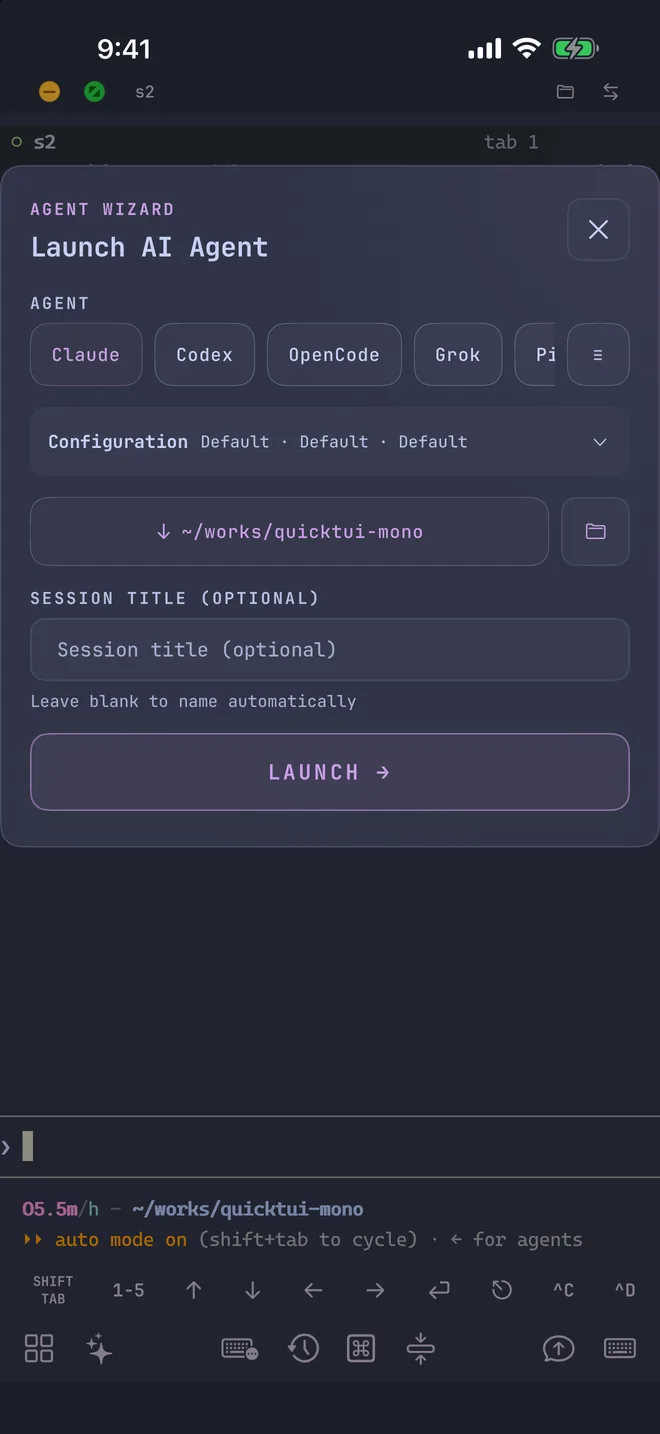
Open the Agent Wizard in the app, choose Codex, and QuickTUI starts it in a new window of the current tmux session or a new tab of the current Herdr workspace. The wizard isn't available on the Luvus backend.
- Mode
- Default keeps Codex's approval and sandbox settings. YOLO adds
--dangerously-bypass-approvals-and-sandbox, so it runs without approvals or a sandbox; use it only where that's safe. - Model
gpt-6-astra,gpt-5.6-sol,gpt-6-solorgpt-6-luna, passed with--model. Add your own under Settings > Agent Models.- Reasoning effort
- Passed as
-c model_reasoning_effort=…. - Resume
- Continue an earlier session with
codex resume <id>. Resume isn't available when the workspace runs on Herdr. - Working directory
- Pick the project folder, with recently used folders one tap away. Save frequent combinations as presets.
You can also start it yourself on the computer, in a named tmux session:
tmux new-session -s codex
codex
Tips for Codex on a phone
- Scrollback under tmux
- When Codex draws in tmux's main screen, its output can repeat in tmux scrollback. The app detects this and shows a hint. Set
alternate_screen = "always"under[tui]in ~/.codex/config.toml; see the FAQ. - Send screenshots
- Attach a file, image or camera photo from the Input Bar. It's uploaded to your computer (up to 10 MiB) and its path is inserted, so Codex can read it.
- Common commands in one tap
- The command palette includes a Codex group with its frequently used commands, so you don't have to type them on a phone keyboard.
- See which session needs you
- With Herdr, the Session Manager marks each Codex session with its icon and shows whether it's idle, working, waiting for input or done.
FAQ
Can I use Codex CLI on my phone?
Codex CLI runs on a computer, not on the phone. With QuickTUI you interact directly with your computer's Codex terminal session from mobile, including approvals and follow-up prompts.
Does it work on Android?
Yes. The QuickTUI Android app is in preview and connects to the same QuickTUI server as the iPhone and iPad app.
Does Codex keep running when I close the app?
Yes. It runs in a tmux or Herdr session on your computer and keeps going after you close the app. Reopening the app takes you back to the live session.
Can I run Codex on a Windows computer and control it from my phone?
Yes. Get QuickTUI Server from Microsoft Store, install Herdr, then pair by scanning a QR code. On Windows, sessions run in Herdr.
Can I run Codex and Claude Code side by side?
Yes. Start each agent in its own tmux window or Herdr tab and switch between them in the app. See Run Claude Code from your iPhone.