Guide · Grok Build
Run Grok Build, the Grok CLI, from your phone
To run Grok Build from your phone, keep it running on your computer and connect to it with QuickTUI. You get the real Grok terminal UI on iPhone, iPad or Android, and the agent keeps working when you put the phone away.
What is Grok Build?
Grok Build is xAI's official coding agent for the terminal. It's open source under the Apache 2.0 license (xai-org/grok-build), installs a command named grok, and runs as a full-screen terminal UI, headlessly with grok -p, or over ACP.
It isn't the same as superagent-ai/grok-cli, a community project that also installs a grok command and isn't affiliated with xAI. This guide covers the official Grok Build.
Set up Grok Build and QuickTUI
- Install Grok Build on the computer where it should run:
# macOS / Linux / WSL curl -fsSL https://x.ai/cli/install.sh | bash # Windows (PowerShell) irm https://x.ai/cli/install.ps1 | iex - Run
grokonce and sign in. The first run opens a browser for your xAI account; on a machine without a browser, usegrok login --device-auth(see the tips below). - Install QuickTUI on your phone: from the App Store for iPhone and iPad, or the Android (Preview) build.
- In the app's setup wizard, choose Connect Over SSH — Enable Enhanced Features (Recommended), enter the computer's SSH login and tap Install. The app installs the QuickTUI server and pairs automatically. If the computer has neither tmux nor Herdr, it installs Herdr.
On Windows, or on a computer without SSH access, run the install command on the computer, then pair by scanning a QR code:
# macOS / Linux
curl -fsSL https://quicktui.ai/q.sh | sh -s -- install --channel server2

# Windows (PowerShell)
& ([scriptblock]::Create((irm https://quicktui.ai/q.ps1))) install --channel server2
The connection between your phone and your computer is end-to-end encrypted and direct by default. See the install guide for details.
Start Grok Build from your phone
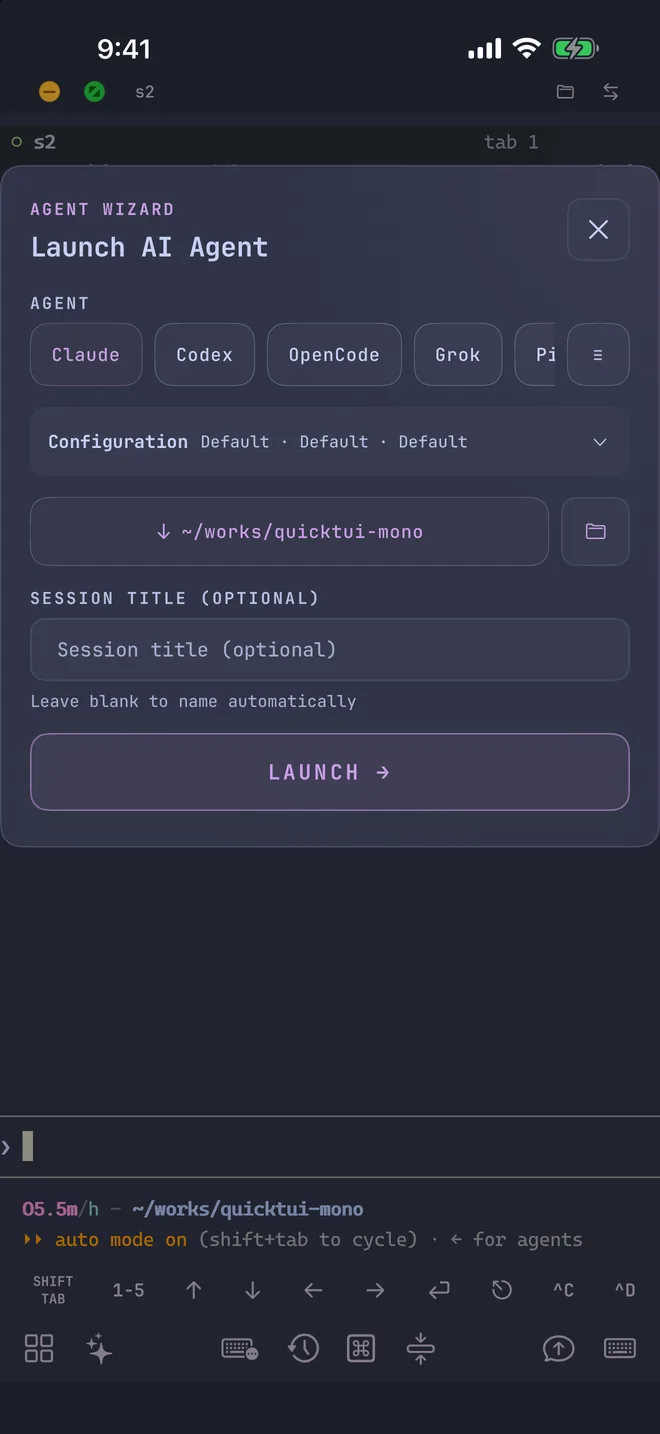
Open the Agent Wizard in the app, choose Grok, and QuickTUI starts it in a new window of the current tmux session or a new tab of the current Herdr workspace. The wizard isn't available on the Luvus backend.
- Mode
- Default keeps Grok Build's approval prompts. YOLO adds
--always-approve, so it runs tools without asking; use it only in a repository you're prepared to let it change. - Model
grok-4.7, passed with--model. Add your own under Settings > Agent Models.- Reasoning effort
- Passed with
--reasoning-effort. - Resume
- Continue an earlier session with
--resume. Resume isn't available when the workspace runs on Herdr. - Working directory
- Pick the project folder, with recently used folders one tap away. Save frequent combinations as presets.
You can also start it yourself on the computer, in a named tmux session you can find later in the app:
tmux new-session -s grok
grok
Tips for Grok Build on a phone
- Sign in without a browser
grok login --device-authprints a code you can complete on any device, including the phone you're holding. You can also setXAI_API_KEYon the computer instead.- tmux settings
- Grok Build's docs recommend truecolor and these tmux options for full color and clipboard support:
Runset -g default-terminal "tmux-256color" set -as terminal-features ",*:RGB" set -g set-clipboard on set -g allow-passthrough on/terminal-setupinside Grok Build to check the terminal. If tmux scrollback fills with repeated output, setalt_screen = "always"in ~/.grok/pager.toml; see the FAQ. - Send screenshots
- Attach a file, image or camera photo from the Input Bar. It's uploaded to your computer (up to 10 MiB) and its path is inserted, so Grok Build can read it.
- Common commands in one tap
- The command palette includes a Grok Build group with its frequently used commands, so you don't have to type them on a phone keyboard.
- See which session needs you
- With Herdr, the Session Manager marks each Grok Build session with its icon and shows whether it's idle, working, waiting for input or done.
FAQ
Can I use Grok CLI on my phone?
Yes. Grok Build runs on your computer and QuickTUI shows its terminal UI on iPhone, iPad or Android, so you can start tasks, answer questions and approve tool calls from the phone.
Does Grok Build keep running when I close the app?
Yes. It runs in a tmux or Herdr session on your computer and keeps going after you close the app. Reopen the app to return to the live session.
Which Grok CLI does this guide cover?
The official Grok Build from xAI. The community grok-cli project is a separate tool; like any terminal agent it runs in QuickTUI too, but the install steps and tips here apply to Grok Build.
Does my code go through QuickTUI's servers?
No. By default the app connects directly to your computer, end-to-end encrypted. Grok Build itself talks to xAI as it normally does.