Guide · Claude Code
Run Claude Code from your iPhone
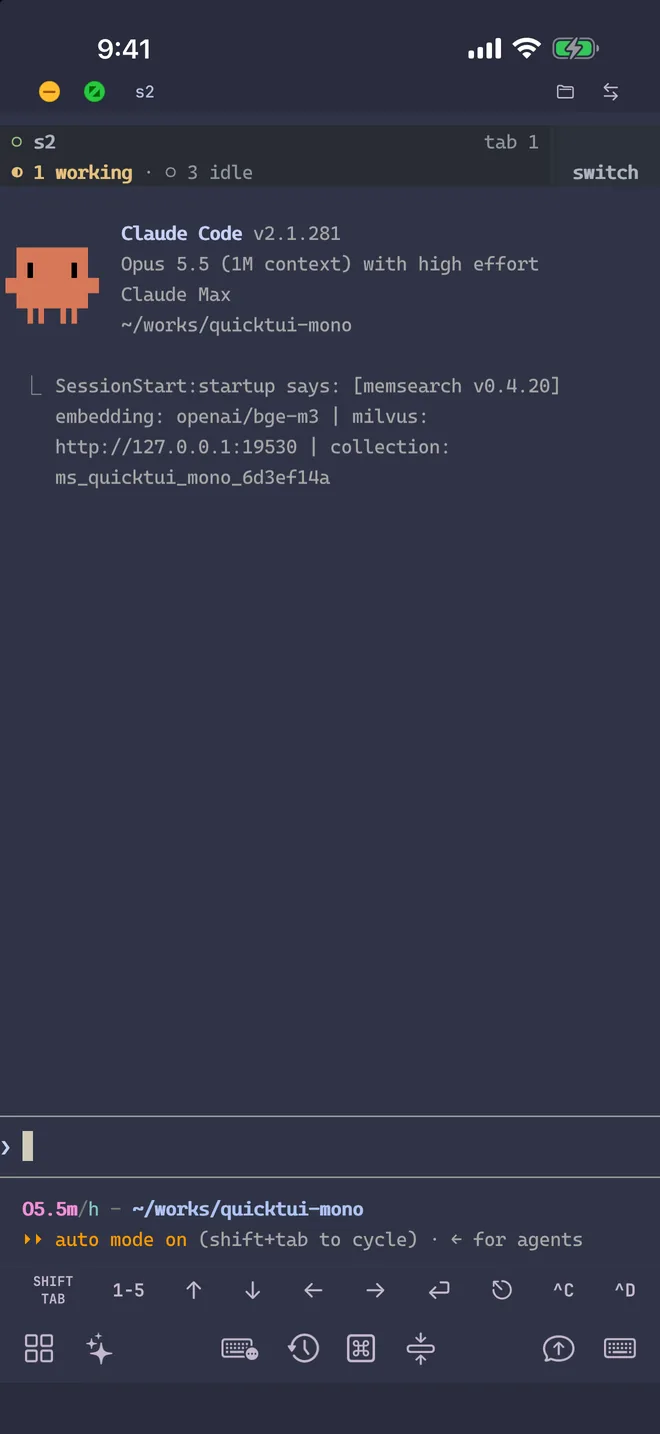
Run Anthropic's Claude Code on your development machine and maintain full interactive control from iPhone, iPad, or Android using QuickTUI. Claude Code continues executing builds, refactorings, and test suites in the background, allowing you to review diffs and grant permission requests from anywhere.
What is Claude Code?
Claude Code is Anthropic's coding agent for the terminal. It reads your repository, edits files and runs commands, asking for approval along the way. Because it's a terminal application, QuickTUI connects you directly to that environment from mobile, attaching to a persistent tmux or Herdr session so long-running workflows survive network disconnects.
Set up Claude Code and QuickTUI
- Install Claude Code on the computer where it should run, then run
claudeonce and sign in.# macOS / Linux / WSL curl -fsSL https://claude.ai/install.sh | bash # Windows (PowerShell) irm https://claude.ai/install.ps1 | iex # Or with Homebrew / npm brew install --cask claude-code npm install -g @anthropic-ai/claude-code - Install QuickTUI on your phone: from the App Store for iPhone and iPad, or the Android (Preview) build.
- In the app's setup wizard, choose Connect Over SSH — Enable Enhanced Features (Recommended), enter the computer's SSH login and tap Install. The app installs the QuickTUI server and pairs automatically. If the computer has neither tmux nor Herdr, it installs Herdr.
On a Mac or Linux computer without SSH access, run the install command on the computer, then pair by scanning a QR code:
curl -fsSL https://quicktui.ai/q.sh | shOn Windows, get QuickTUI Server from Microsoft Store, open it from the Start menu and scan the QR code it shows. Sessions on Windows run in Herdr, which you install separately; see Windows in the install guide.
The connection between your phone and your computer is end-to-end encrypted and direct by default. See the install guide for details.
Start Claude Code from your phone
Open the Agent Wizard in the app, choose Claude, and QuickTUI starts it in a new window of the current tmux session or a new tab of the current Herdr workspace. The wizard isn't available on the Luvus backend.
- Mode
- Default keeps Claude Code's normal approval prompts. YOLO adds
--dangerously-skip-permissions, so it runs tools without asking; use it only in a repository you're prepared to let it change. - Model
fable[1m],opus[1m],sonnet[1m]orhaiku, passed with--model. Add your own under Settings > Agent Models.- Effort
- From low to max, passed with
--effort. - Resume
- Continue an earlier conversation with
--resume. Resume isn't available when the workspace runs on Herdr. - Working directory
- Pick the project folder, with recently used folders one tap away. Save frequent combinations as presets.
You can also start it yourself on the computer, in a named tmux session you can find later in the app:
tmux new-session -s claude
claude
Tips for Claude Code on a phone
- Use fullscreen mode in tmux
- Run
/tui fullscreen(Claude Code 2.1.89 or later) so tmux scrollback doesn't fill with repeated output. When the app detects Claude Code drawing in the main screen under tmux, it shows a hint with the same advice. See the FAQ. - Fix stray color codes
- If text like
11;rgb:2828/2c2c/3434appears in the prompt, set a fixed theme with/theme. See the FAQ. - Send screenshots
- Attach a file, image or camera photo from the Input Bar. It's uploaded to your computer (up to 10 MiB) and its path is inserted, so Claude Code can read it.
- Common commands in one tap
- The command palette includes a Claude Code group with its frequently used commands, so you don't have to type them on a phone keyboard.
- See which session needs you
- With Herdr, the Session Manager marks each Claude Code session with its icon and shows whether it's idle, working, waiting for input or done.
Claude Code Remote Control vs QuickTUI
Anthropic's Remote Control lets the Claude app or claude.ai/code continue a Claude Code session running on your computer. It requires a Pro, Max, Team or Enterprise login (API keys aren't supported) and works with Claude Code only.
QuickTUI gives you the terminal itself, attached to tmux or Herdr. That means it works whether Claude Code signs in with a subscription or an API key, runs any other CLI agent next to it, and lets you switch between several sessions on iPhone, iPad and Android. If you only use Claude Code on a supported plan and prefer a chat-style view, Remote Control is a good fit; if you want your full terminal and more than one agent, use QuickTUI.
FAQ
Does Claude Code work on iPhone?
Claude Code runs on a computer, not on the iPhone itself. With QuickTUI you control your host computer's Claude Code session from your iPhone in a full terminal, reviewing the exact prompts and approvals you would see at your desk.
Can I use Claude Code on Android?
Yes. The QuickTUI Android app is in preview and connects to the same QuickTUI server, so you can control Claude Code from an Android phone the same way.
Does Claude Code keep running when I close the app?
Yes. It runs in a tmux or Herdr session on your computer and keeps going after you close the app. Reopening the app takes you back to the live session.
Can I run several Claude Code sessions at once?
Yes. Start each one in its own tmux window or Herdr tab, or its own session, and switch between them in the app.
Does my code go through QuickTUI's servers?
No. The app connects directly to your computer by default, end-to-end encrypted. The optional QuickTUI Cloud relay, used only when a direct connection isn't possible, also carries end-to-end encrypted traffic.